




Out of the BoxCube 2.0 Mini Scale
Just way too much environmentally-unfriendly stuff in the box the Cube 2.0 Mini Scale ships in. That black polystyrene type material you find in many Asia-sourced coffee gear. If MHW-3Bomber wants to really distinguish themselves from the rest of the crowd, they should work on making their packaging 100% recyclable and biodegradable. And then make a big deal about it.
When you open the box, there’s a top layer of polystyrene, then the user manual. Under that, the scale silicone mat, and the scale itself becomes visible, and both look to be wrapped in biodegradable bags (that’s good, at least).
Inside the front portion of the box, once flipped open, you’ll find another bag that contains a USB-C (both ends) charging cable.
We ordered the black model of the Cube 2.0 Mini, which has a matt black, granular finish to the main scale, a black silicone mat, and a black charging cable. It also comes in white; that version has more of a glossy mirror finish to the scale, a light grey silicone mat, and a white charging cable.
The scale is designed similar to the Acaia-pioneered design; that is the weighing pan is actually upside down, compared to traditional scales. The main pan is inside, surrounded by the top wraparound cover that also contains the scale electronics and LCD readout. This design makes these kind of scales water resistant, because water getting into the electronics and weighing mechanisms has a much more difficult path than traditional scales.
To further add to the water resistance, the Cube 2.0 mini scale has a silicone cover for the charging port, and the 3-position power slide on the back of the scale has gaskets to prevent water ingress.
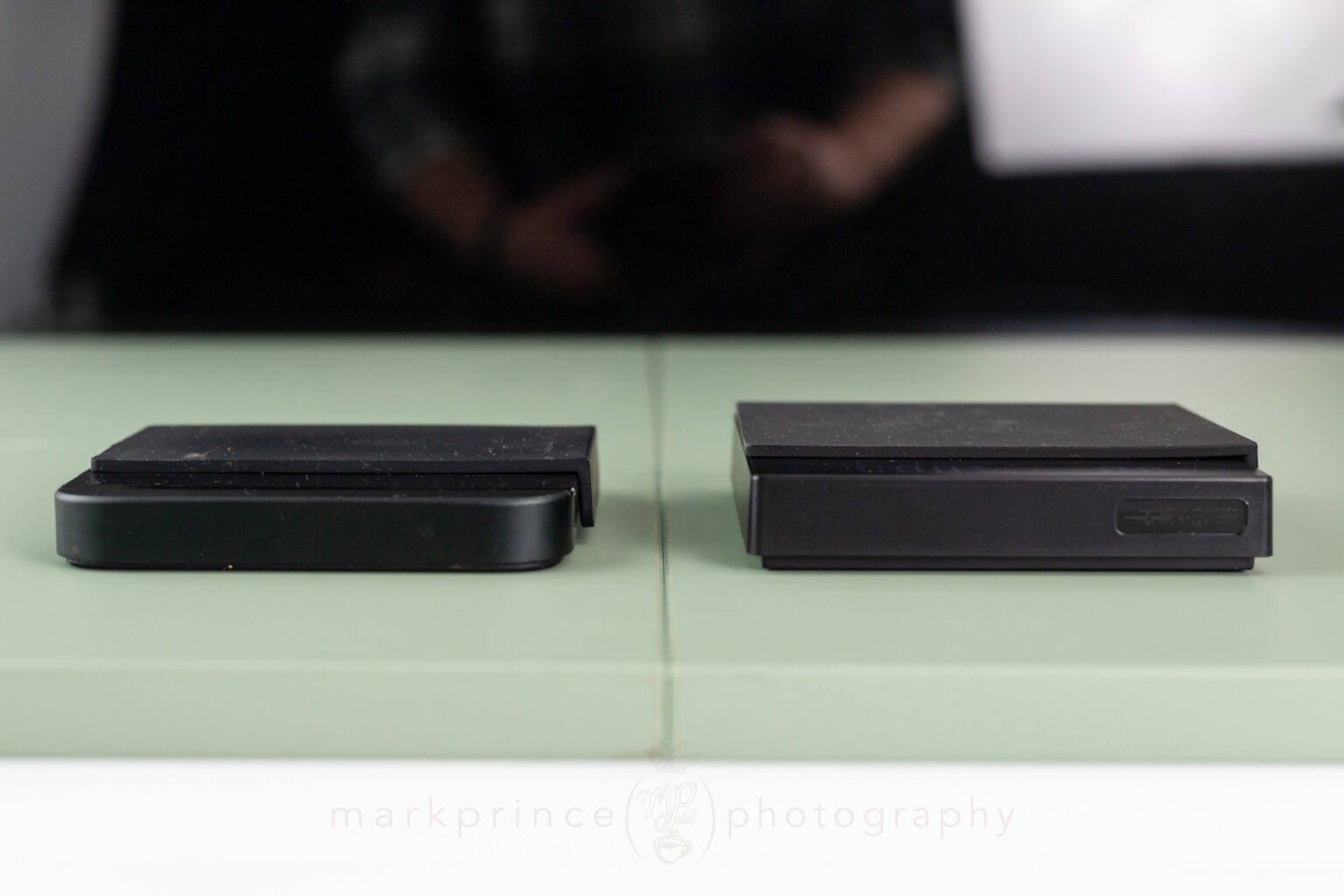
The scale is tiny: 10.5cm square, and just under 2cm tall without the silicone mat. It is roughly the same width and depth as the Acaia Lunar scale, and about 3mm taller. It also weighs less than the Lunar; this makes sense because the Acaia Lunar is mostly metal and the 3Bomber Cube Mini is mostly plastic.
There are two long “grip strips” on the bottom of the scale, which keep it from sliding much, especially on smooth countertops. No complaints there.
There is one physical control on the scale, the aforementioned power button. It has three positions: off, on, and on with sound. There is no volume control on the scale, the beeps are either on or off via this switch. And the beeps are pretty loud, so you might want to keep it in the sound-off position.
The rest of the scale’s controls are via two capacitive touch areas on the front left and right of the top panel. And this is where the MHW-3Bomber Cube 2.0 Mini scale differs from other scales. When the scale is powered up, the display and soft-touch buttons light up. On the right is a T button, which on most scales is the “tare” or zero-out button. On the left is a power symbol button.
But the “T” button is not the tare function button on this scale (except in one instance). It is the timer button. The power button on the Cube 2.0 Mini scale is the tare button… in every circumstance but one instance in smart mode. Confusing, right? I’ll get to this.
These two buttons serve several purposes. Let’s start with the T button. Double tapping it will change the scale from grams to ounces. A single tap will start the scale timer. Another single tap will stop the timer. A long press will zero out the timer. In the scale’s “smart mode”, at one stage, it becomes the tare function, zeroing out the timer. There’s no indication to you, the user, of this change from the power button’s function to the T button, but it is what it is.
The power button on the left has several functions as well. If the scale is off, pressing that area will power on the scale. Long pressing it will power the scale off. Tapping it tares the scale back to zero. Double tapping it puts the scale into a smart mode. Double tapping again turns off the smart mode

Touch Panel
The main display and touch panel area of the 3Bomber Cube Mini scale. Power button is on the left, and doubles as a tare button and a smart mode start button. T on the right is for starting and stopping the timer, and changing from grams to ounces.
The layout of the display is:
- power button on the far left,
- timer numbers on the left,
- a battery power indicator, volume indicator, and smart mode indicator in the middle,
- weight readout and grams / ounces indicator on the right, and
- T button on the far right.
All are invisible when the scale is powered off or in standby mode. When lit up, the scale display is quite bright, especially compared to our pre-2022 version of the Acaia Lunar scale.
One of the best features on this scale is the auto-on mode, at the expense of slightly less battery life. The Cube 2.0 Mini scale is designed to automatically power on the display if it detects 100g or more on the scale for 2 seconds. And it will zero out the scale when powering on in the process.
That means if you place a dosing cup or portafilter on the turned-off scale, it will power up, and tare out to zero, ready for you to add coffee or dose into the portafilter to get your coffee weight. I quickly came to love that feature, wishing it was on my other scales. The downside to this is the scale is always chewing away at the battery in minute amounts. It’s not much, but it is going on.
The Mini version of this scale has a 700mAh lithium battery installed. The company has specific warnings about not using a fast charger to charge this battery. This makes me wonder how many of these scales will get torched by folks plugging it into their Macbook Air or Google Pixel Phone USB-C mega-wattage fast chargers. Seems like an area they could have better designed for. Just be warned.
The silicone mat that comes with the scale is reversible, and has a L-bend portion for resting portafilter handles on when using it flipped over. This mat is essential to avoid heat-transmitted weight drifts in the readout.
The scale power on time is faster than the pre 2022 Acaia Lunar we have here (the more recent Lunars are supposedly faster, though we do not have one to confirm this). The Acaia wins on response time, showing changes in weight faster than the Cube 2.0 Mini scale, but not by much.
I tested the scale’s calibration out of the box with a standard set of calibrated 250g, 500g, and 1kg weights. It was off by .3g on the 250g test. .6g on the 500g test, and .9g on the 1kg test. I’d consider this pretty accurate. To further test the scale, I measured 20.00g exactly on the Acaia Lunar (which goes to .01g accuracy reading), and got 20.0g on the Cube 2.0 Mini.

Acaia Lunar and 3Bomber Scale
Side by side, both the Lunar and 3Bomber scales are the same width and depth, but the Acaia remains one of the lowest profile scales available today.

Support CoffeeGeek
If you enjoy and learn from this resource, please consider making a one time or recurring donation to help support our work and fund purchases for future reviews.
Using theCube 2.0 Mini Scale
We actually covered a fair portion of the MHW-3Bomber Cube 2.0 Mini scale features and uses in the Unboxing section above, but to recap some of the salient points:
- This scale has an auto-on, auto-tare feature for portafilters, brewing devices and bean cups (over 100g) which really improves the scale’s workflow
- This scale is very small and fits on most espresso machine drip trays with adequate cup clearance to portafilter spouts
- This scale’s display is nice and bright, with a fast power on time and decent response time to weight changes
- The scale, though lightweight and all plastic, sits nice and firm on most counters because of the grippy strips on the bottom of the scale.
- The scale’s weighing pan is pretty accurate, matching the Acaia Lunar for under 50g weights, and within .3g when testing with a calibrated 250g weight.
The scale’s brightness is very nice; it is easier to read and brighter than the Acaia lunar scale, which really stood out for me in the main area I was using this scale, by a western-facing window in our home. There were times in some afternoons I could barely read the Acaia scale, but the Cube 2.0 Mini was easy to read at all angles.

Acaia Lunar and 3Bomber Scale
We did a lot of side by side testing of these two scales. The 3Bomber starts up quicker, but the Lunar registers changes faster. As you can see, the 3Bomber's display is a lot brighter than the Acaia.
Pour Over Use
This is a small scale, but it can accommodate most single-serving pour over systems I have. Putting an eight cup Chemex on it is a bit of a stretch, but since the scale’s max capacity is 2000g, you could do it, and still just barely see the readout area.
Using your standard 300-500ml carafe and a Hario pourover system on this scale works great. The button touches are almost always registered, and that’s saying something: I’ve tested a lot of scales and kettles recently with capacitive touch buttons, and sometimes they require 2 or 3 presses to get what you want done; not so with this scale. I would even say it is more accurately reading finger touches than the Acaia Lunar.
All scales experience drift in weights when heat is applied, even if you have a silicone mat on top, and this scale is no different. What makes scales better or worse is how long they remain stable before the weight starts driving downward. The Cube Mini 2.0 would start showing a slight drift about 2 minutes into a brew, and only by .1g every 5 or 10 seconds, which I consider to be very adequate. For pour over coffee, this kind of drift isn’t of any consequence.

Pour Over Use
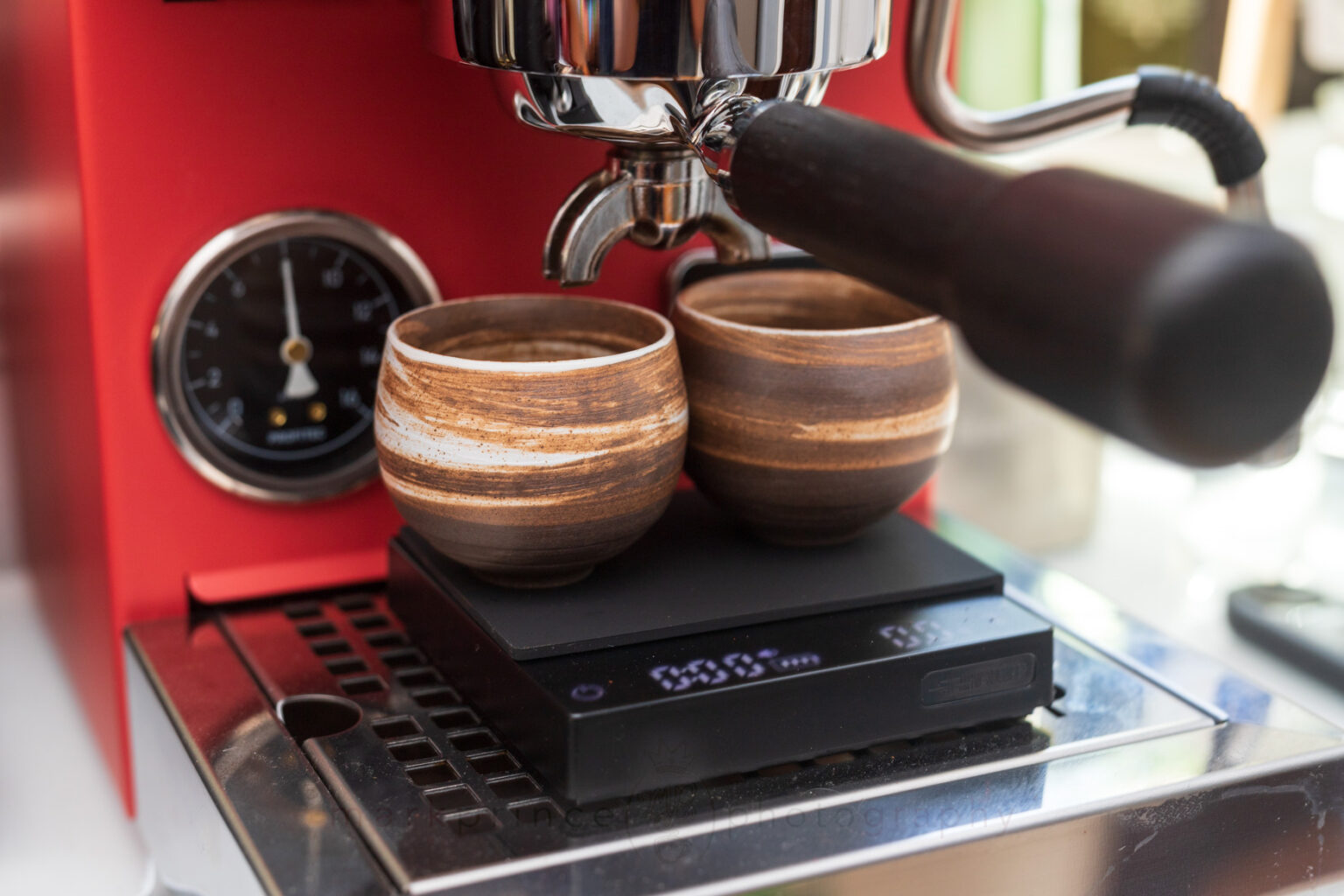
The scale is small but can work with most pour over systems up to 750ml, and possibly even 1l with smart positioning. The scale has a 2000g capacity.
Pour Over Smart Mode
The Cube 2.0 Mini scale has a smart mode (just one, but it’s been designed to work for both espresso and pour over brewing). It’s not very intuitive, and other than providing some rudimentary information if you’re writing down your brew information, not worth doing. Still, it will give you the following outputs at the end of a pour over session: Brewing ratio; starting coffee weight; brewing time; and total water used.
There is one particular mode within the smart mode that is actually smart though (got all that!). The scale knows the difference between water flow weight addition, and one time “bulk” addition. So once the scale is full on in smart mode, mid way through, after you add your coffee and press the T button to “record” the coffee volume, the scale will zero out. Then, if you add cups, or something more than 30g at one go, the scale knows this is not brew flowing, so it will zero out that added weight.
This is good if you’re adding a flow controller, porcelain cap, or top-mounted water reservoir, or adding cups to the scale, after measuring the beans, but before commencing the brew.
To access the scale’s Smart Mode, power unit on, then double tap the power button. A water droplet appears on the screen, showing smart mode is engaged. The smart mode also changes the function of this scale’s “T” button to what most scales “T” button does – it turns it into the tare function, once you are in the middle of the smart mode steps. Here’s the process.
-
Put dosing cup / bean holder on scale, tap the power button to tare the scale.
-
Use the scale to measure your beans as normal. Hit the power button to tare out things when necessary.
-
Put the brewer (cup / carafe + filter holder + filter material, pre-rinsed) on scale. The weight of the brewer is not factored into the smart scale’s function so press the power button to tare it once more.
-
Add ground coffee to brewer. The scale will be showing the ground coffee's weight.
-
Press the T button this time, to record the ground coffee weight. This press also serves to set the scale into the motions of its full smart mode.
-
At this point, the water drop will flash to show it’s recorded the ground coffee weight, and the scale zeros out.
-
Start pouring your brew water; the timer should start automatically.
-
Do your brew pour in whatever stages and pause you normally do.
-
Once done, remove everything from the scale, immediately, and the scale will stop the timer.
-
The scale at this point will switch to showing you brew results: It will alternate between showing you a) brewing ratio (something like 1:16), and coffee weight, and b) brewing time and total water used.
Again, not super intuitive, but it does provide recordable results if you’re tracking and evaluating your coffee brews.
Espresso Use
For espresso, the best feature by far is the auto on and auto tare, which we’ve already covered. The scale is also small enough that it will sit just fine on most espresso machine drip trays. There’s even the ability to put it on the Gaggia Classic Evo Pro (with its notoriously short height drip tray area), though your standard espresso cups will have to be fit around the portafilter’s brew spouts.
Response time is good, and certainly better than some other cheap scales I’ve used. The Acaia Lunar is faster, though not readily noticeable.
The Smart Mode for Espresso is the same mode for pour over, though the scale will auto zero out after it is placed on the espresso machine’s drip tray, and espresso cups are added. Here’s the workflow.
-
Use the silicone mat (flipped over) for espresso portafilter.
-
Put the portafilter on the scale. It should wake up, and zero out.
-
Double tap the power button to enter smart mode.
-
Grind coffee into your portafilter and weigh it. Adjust the coffee if necessary (remove, add some, WDT it, etc). Once happy, with the PF on the scale, pres the T button.
-
The water drop will flash to show it has recorded the espresso ground coffee weight.
-
Insert the PF into the espresso machine.
-
Put scale on machine drip tray, place your cup on the scale. The scale should automatically zero out the weight of the cup.
-
Start your shot. The scale timer should start as soon as it detects the weight of espresso flowing into the cup.
-
When the extraction is done, remove the cup.
-
The display will change, and show results, alternating between a) shot ratio (something like 1:2.2 or similar) and coffee dose, and b) shot time, and total shot weight.
The work flow isn’t super intuitive, but if this is your only scale, you should get used to it. I don’t think the smart mode is as valuable for espresso brewing as it is for pour over brewing. I think just using the scale in “dumb mode”, first measuring your dose, then using it to measure the shot volumes is useful enough.
Subscribe to
Coffee Pulse
Join the 12,850 other coffee lovers who receive CoffeeGeek's premier newsletter. Each issue dives deep into one coffee or espresso based subject. Subscribing is free, and your personal information is never shared.

Support CoffeeGeek
If you enjoy and learn from this resource, please consider making a one time or recurring donation to help support our work and fund purchases for future reviews.
ComparisonsCube 2.0 Mini Scale
The obvious comparison product here is the Acaia Lunar scale, a scale that costs 5 times as much as this scale. I’d love to compare this scale to the Timemore Black Mirror scale, or their Nano Scale, but we don’t have either here at CoffeeGeek.
We do have the DiFluid Microbalance Ti scale here, which we are currently reviewing, and I do have to say the Microbalance is a better scale in almost every regard, with the exception that it doesn’t have the auto-on feature. Unfortunately, the Microbalance Ti is a larger scale (halfway between the Acaia Lunar and Acaia Pearl in size), and costs $150. It is a full smart scale, with bluetooth connectivity and a fantastic app environment, both things the Cube 2.0 Mini Scale does not have.

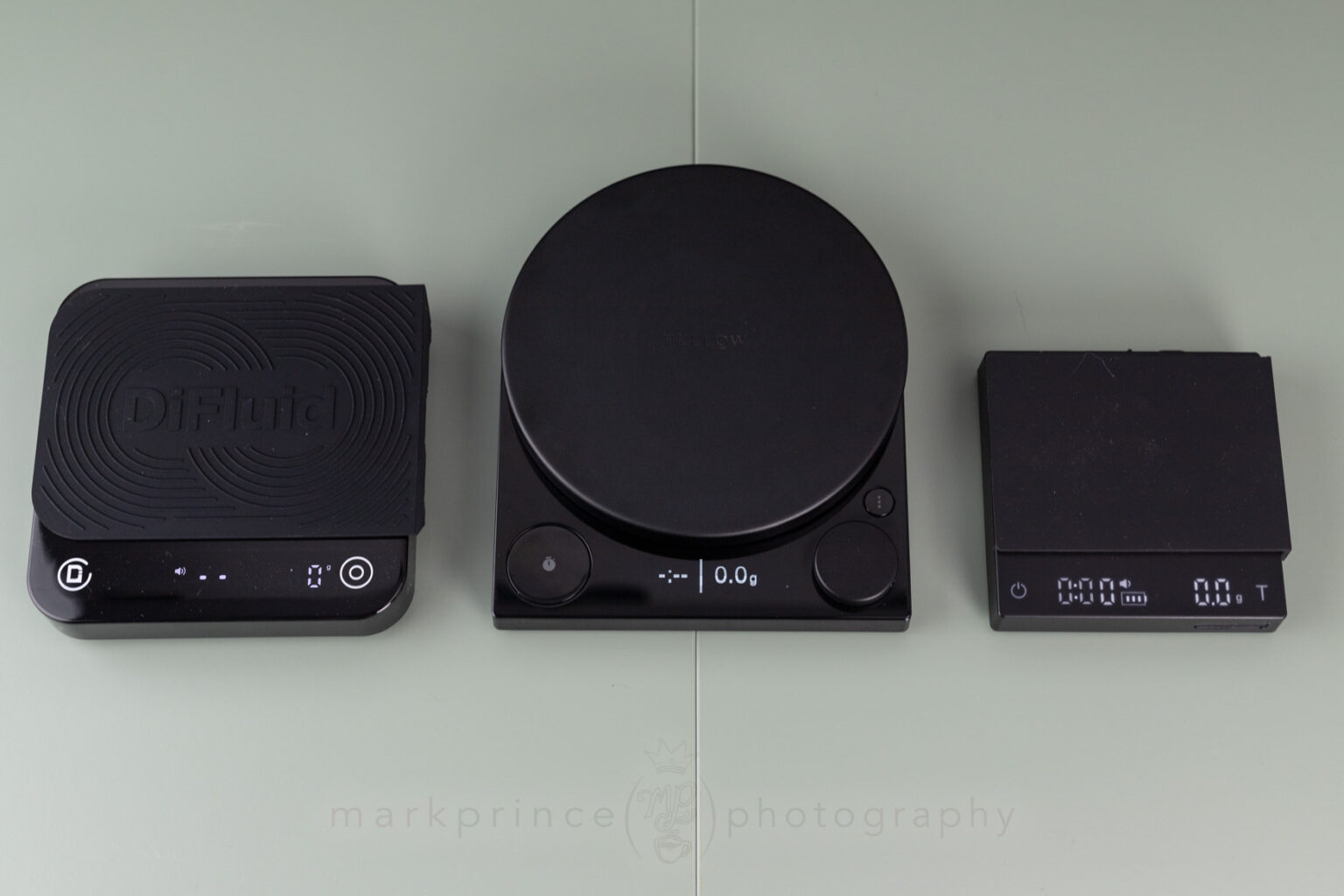
Three Scales
The Microbalance Ti (left), Fellow Tally Pro (centre) and MHW-3Bomber Cube Mini (right). Note the size differences. The Fellow is the only one with an OLED display.
We bought a Maestri Mini House Scale to compare against the MHW-3Bomber scale, because it seems a similar size and ability, for $30. Unfortunately, the scale stopped working after one week. It was sent back to the US Amazon store, but got lost in transit, and we don’t have a replacement.
I was able to compare some things about the scale before it stopped working. It has a smaller battery (500mAh vs the Cube’s 700mAh battery), wasn’t nearly as accurate, and had a much slower power on time and reaction time. It also doesn’t have any real smart features, other than an auto-start timer. For just $10 more, the Cube 2.0 Mini offers a lot more functionality. And ours hasn’t broken yet in over 45 days of testing.
The Acaia Lunar
Compared to the Acaia Lunar, the MHW-3Bomber beats it in four areas: the display is brighter; the auto-on / auto-tare feature is excellent; it powers on faster; and it doesn’t slide around the counter like the Lunar does.

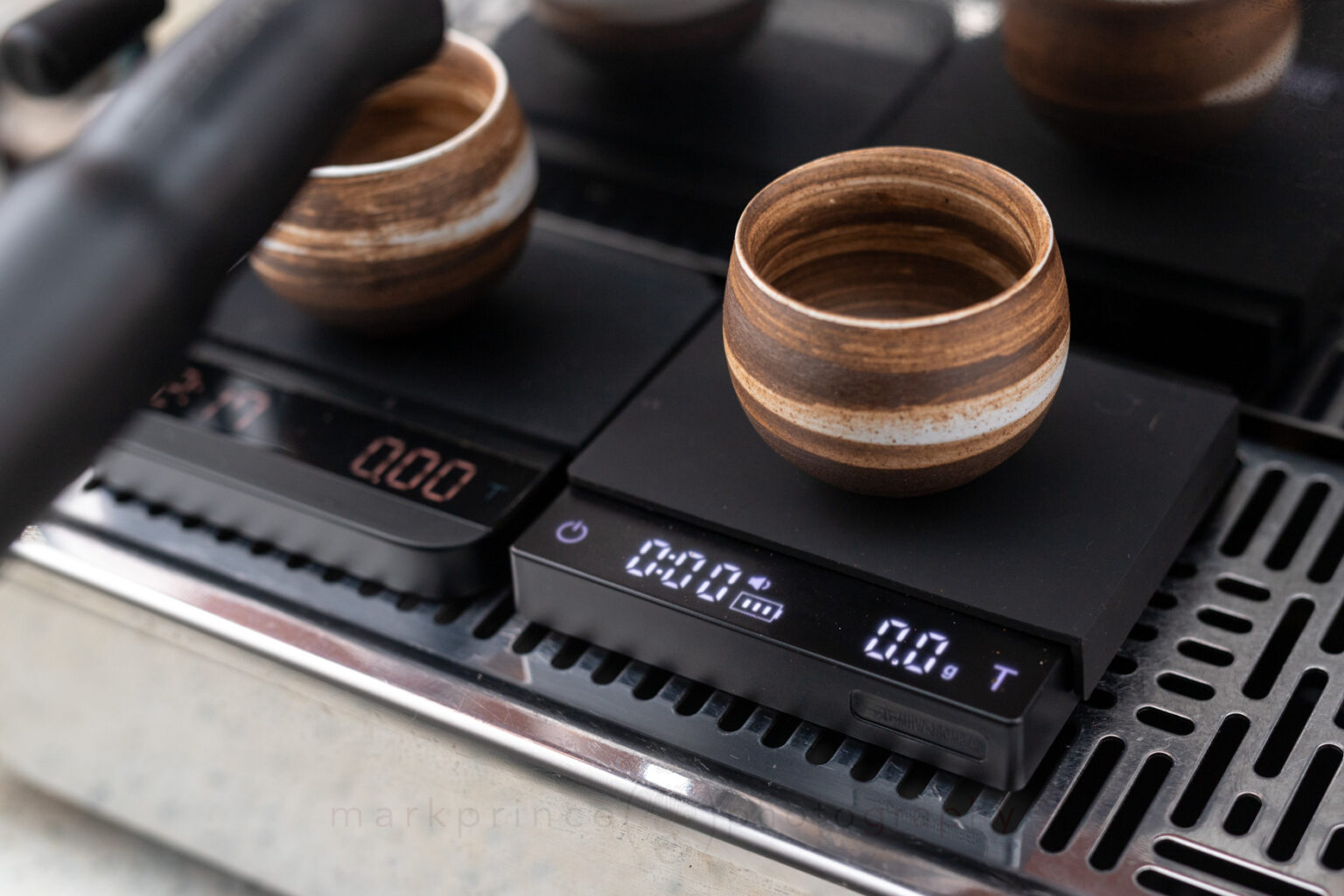
Espresso Machine Use
The 3Bomber Scale, next to an Acaia Lunar (on the left), on a GS3 espresso machine. Note the difference in displays.
The Lunar has additional smart modes, including auto start and stop features, flow rates, and can be put into a .01g reading mode. It is also all metal in construction, and a bit more water resistant. The Lunar is bluetooth enabled, and does have an app environment, but it is very poor, especially on Android. Apparently the Lunar can work with third party software, which is something we haven’t explored at CoffeeGeek. The Cube Mini does not have bluetooth and no app ability.
Both scales are the same width and length. Both work well on most drip trays, and both would work fine with manual lever machines like the Flair 58.

Scales Side By Side
Subscribe to
Coffee Pulse
Join the 12,850 other coffee lovers who receive CoffeeGeek's premier newsletter. Each issue dives deep into one coffee or espresso based subject. Subscribing is free, and your personal information is never shared.

Support CoffeeGeek
If you enjoy and learn from this resource, please consider making a one time or recurring donation to help support our work and fund purchases for future reviews.

ConclusionCube 2.0 Mini Scale
If you’re looking for a good quality budget (under $50) espresso focused coffee scale that can easily do manual brew methods up to 1litre in volume, the MHW-3Bomber Cube 2.0 Mini Coffee Scale is one to consider. We’ve put our unit through enough work to require 12 charges so far, and it is still going strong.
To repeat for the tenth time, the best feature is the auto-on, auto-tare feature when 100g or more is put on the scale. I got so used to this feature, when I went back to my standard scale (the DiFluid Microbalance), I found myself missing it quite a bit.
The display is also first rate and very easy to see and read in most lighting conditions. I cannot say that for the Acaia Lunar, which seems to be fading as time goes by. You don’t expect that from a $250 appliance.
Response time is good. Button presses on the capacitive touch panel almost never miss, and the scale is quick to react to your interactions. The smart mode could be better thought out, and the T button not being for Tare will throw people off, but overall, the scale is enjoyable to use and will serve quite well for the home coffee enthusiast.


4 Responses
Hello,
thank you for the indepth review. I’m looking a for a scale for baking that measures < 1g increments – looks like this one fits the bill. Also, where did you get those fabulous espresso cups?
I was wondering also if any of these scales have a calibration mode?
I use an Acaia Lunar with my Decent XL and my scale has a brighter screen than seems shown in your images. Control of the Acaia is quite complex, with a steep learning curve, perhaps you missed an option for led brightness? Once I got an option that worked I stayed with it. Nevertheless, if this had been available I would have considered it. I can say that Acaia support is excellent, that may not be the case with a lower priced competitor.
I’m guessing you have the current Acaia Lunar 2022 model. They improved the brightness on it; the one in the photos is the pre-2022 model and it is very dim, and getting dimmer over time. There is no brightness setting on the pre 2022 model; the only change you can make is set the battery saver to dim the display 20% after a certain time, but otherwise, it’s a max brightness. As mentioned, it is getting dimmer over time, and for such an expensive scale, that’s an ongoing concern.
Also, I’ve been using these scales since 2014, and pretty much know every single feature they have 🙂